
1. Your people check in on Telegram
Long legs, short check-ins. A tap and a site name when they arrive. When they finish they type what they did. No roster to maintain: the roster is the check-ins.
🇦🇺 Built in Australia for crews across sites · Pay for Active Worker-Days, Not Idle Roster Seats
Every approval permanent and traceable.
Your crew checks in and out on Telegram, supervisors approve in one tap, and Friday hours land straight in your Xero Payroll, subcontractor draft bills, or payroll CSV.
Then comes the plot twist: drop in your existing Word or PDF site forms, delivery orders, and licences — ZimQi extracts your company logo and design guidelines, runs them through the same Telegram chat (using your own AI for 0 credits or ZimQi AI), and files the finished, standardized branded PDFs and site photos straight into your own Google Drive (Dropbox also live · OneDrive coming soon).
 Start on Telegram
Free trial: 30 days or 100 credits, whichever comes first · no card
Telegram is a trademark of its owner. ZimQi isn't affiliated with Telegram.
The ZimQi emu can't fly. Your Friday paperwork can.
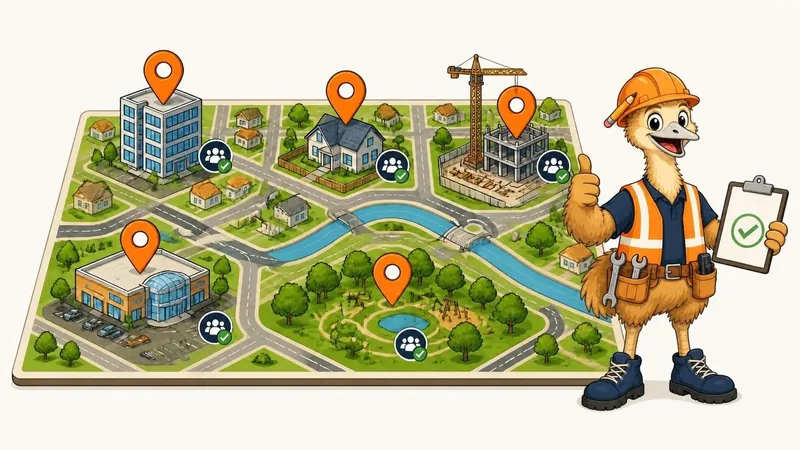
Illustrative example: names and times are made up.
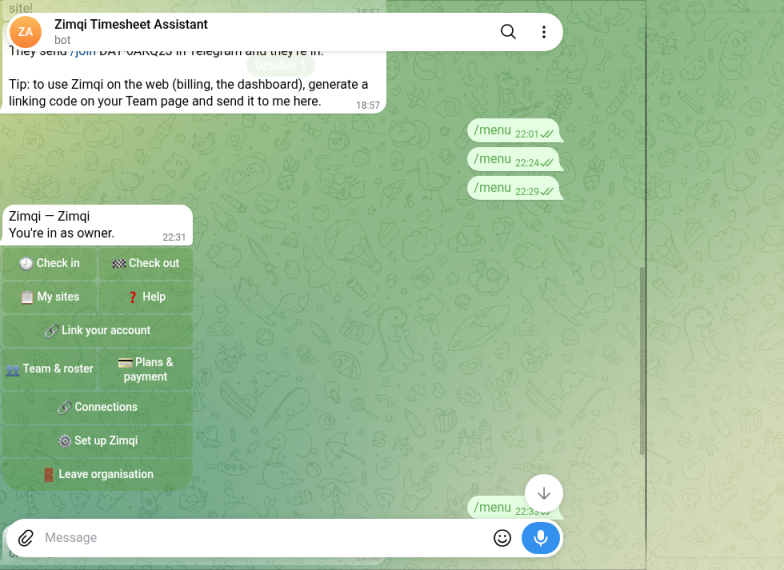
Real Telegram App · @zimqi_assistant_bot
✓ Live Bot CapturesStep 1 — Real Telegram Menu (`Zimqi Timesheet Assistant`): Crew tap 🕓 Check in, 🏁 Check out, or 📋 My sites right inside the real Telegram app — zero new app to learn.
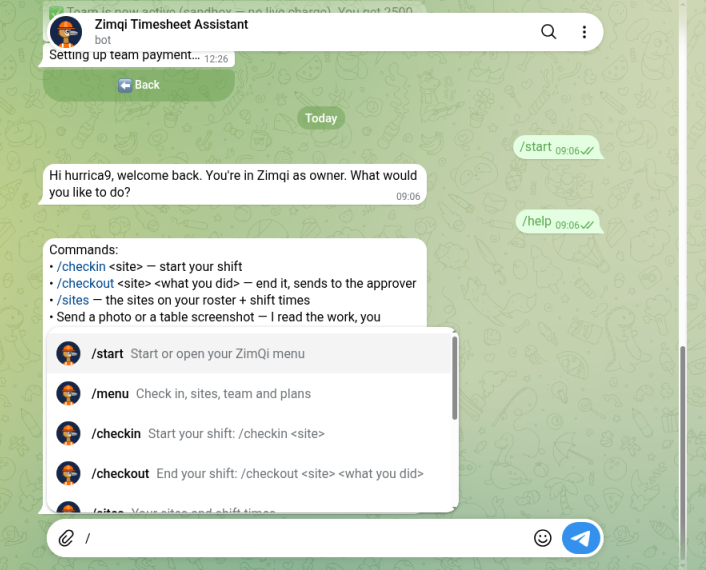
Step 2 — Slash Commands & Shift Notes: Workers type /checkin <site>, /checkout <site> <what you did>, or attach a site photo when a Smart Form asks for one; supervisors get instant Approve/Reject buttons.
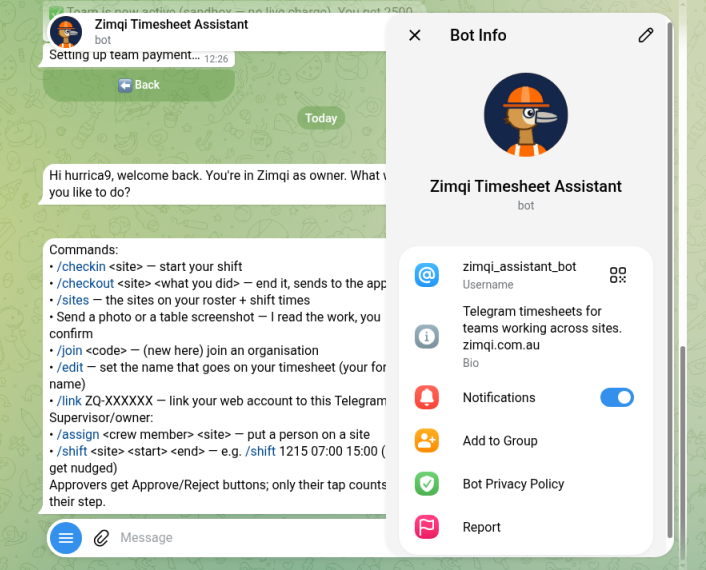
Step 3 — Verified `@zimqi_assistant_bot` → Structured Drive & Xero Outputs: Approved shifts & forms flow straight to your Google Drive or Dropbox (OneDrive coming soon), Xero Payroll, Xero Draft Bills, or CSV.
Company/Site/YYYY-MM/Forms & Records (Dropbox live · OneDrive soon)
ACCPAY Draft Bills & clean CSV
 Scan for @zimqi_assistant_bot
Real-Screen Industry Walkthroughs · @Zimqi-online on YouTube
Real screen captures with Zemke in the presenter corner: watch workers check in via @zimqi_assistant_bot, attach site photos, complete trade-specific Smart Forms, and generate standardized PDFs with each company’s own logo & ABN stamped in the top-left header right inside Google Drive or Dropbox (OneDrive coming soon).
@zimqi_assistant_bot check-in, switchboard isolation photo, Smart Form pre-start, and 1-tap supervisor approval.SWMS-01, v1 & v2-Amended version history, and compliance verification tick marks (✓).drive.google.com (Company > Site > Date > Forms | Photos | Timesheets), with animated Zemke in the presenter bubble.@zimqi_assistant_bot check-in, pressure-test gauge photo, gas compliance checklist, and supervisor approval.PLM-01, v1 & v2-Amended version tracking, and compliance verification tick marks (✓).@zimqi_assistant_bot check-in, harness & anchor-point photo, working-at-heights SWMS, and 1-tap approval.ROOF-01, v1 & v2-Amended version history, and compliance verification tick marks (✓).@zimqi_assistant_bot check-in, completion photo, scope sign-off form, and supervisor approval.CLN-03, v1 & v2-Amended version history, and compliance verification tick marks (✓).v1/v2 Site Records Blueprint
Read the complete blueprint with the animated Crew Corner Episode 1 cartoon, 5-level Company > Site > Date > Forms | Photos | Timesheets Drive tree, and 10 instant company-logo-stamped sample PDFs across 4 Aussie trades.
How it works
One simple loop, every week. Built for gloves-on thumbs and end-of-day brains.
Long legs, short check-ins. A tap and a site name when they arrive. When they finish they type what they did. No roster to maintain: the roster is the check-ins.

Supervisor, bookkeeper, owner, in whatever order suits your business. Every approval, edit and rejection becomes a permanent, timestamped record of who did it and when.

Approved hours become a clean CSV for your bookkeeper. No re-typing, no shoebox of dockets.

Reminders go out on schedule, tied to the shift times you set for each site, so nobody forgets to check in or check out. (We've heard it's very relaxing. The emu does the polite nagging.)
See the whole loop →Start with timesheets. Unlock your whole site.
We call ZimQi a timesheet tool because nobody wakes up wanting “enterprise field software.” You just want Friday afternoon back. But once your crew is checking in on Telegram, the exact same chat quietly handles the rest of your site paperwork — without forcing anyone to learn a new app.
Upload a sample Word, PDF, or scanned paper form from Web or Telegram (WhatsApp coming soon). ZimQi automatically extracts your company logo and design guidelines (brand colours, headers, and table layout), turns the questions into one-at-a-time Telegram prompts (with tap buttons, photos, pause/resume, and auto-filled site & worker details) — and produces a standardized, branded PDF or Word document automatically.
Connect your Google Drive or Dropbox once (OneDrive coming soon). Whenever a worker finishes a site checklist or snaps a job photo in Telegram, the completed branded PDF/DOCX and timestamped photos file themselves straight into your own site folders automatically.
Push approved employee hours to Xero Payroll AU (they land as drafts for you to check — ZimQi never auto-approves them), or download a bookkeeper CSV. Approved subcontractor hours or photographed invoices become draft bills for your accounting software, ready for you to check.
Store worker licences, White Cards, Working with Children checks, and company insurances. ZimQi sends automatic 30-, 14-, and 7-day expiry nudges before a ticket lapses, with one-tap renewal.
Every ZimQi plan includes our live MCP server and REST API at no extra cost. Plug in Claude, Cursor, or another MCP client to check live attendance or query site records using plain English. A ChatGPT app is not listed yet; you can still use your own ChatGPT API key in Your AI Bucket.
Live today
No vapourware here. Everything on this list is part of the timesheet loop that's live today.
Your people pick their site or location and tap in. No extra app if they're already on Telegram.
Type what you did. One narrow AI step structures it, and anything unclear gets flagged, never guessed.
When someone checks out, a named owner or approver gets the timesheet in Telegram or the web and taps approve or reject. Every decision is permanently timestamped.
Import existing Word, Excel, PDF or photo checklists into Smart Forms. Crew fill them in Telegram or web (with pause/resume & auto-prefill), and branded PDF/Word reports plus site photos save straight to your Google Drive or Dropbox (OneDrive coming soon).
Log single or multi-day leave and find available cover filtered by worker skill. ZimQi does not auto-generate shift schedules, and roster import is not currently offered.
Tag worker skills and track White Cards, First Aid, SWMS and company insurance expiry dates with automatic reminders and one-tap renewal.
Reminders go out on schedule, tied to the shift times you set for each site, so nobody forgets to check out, finish a paused form, or sign off.
Every approval, edit and export is permanently timestamped. Push approved employee hours to Xero Payroll AU (as drafts for you to check), download a bookkeeper CSV, or prepare draft bills for your accounting software from approved subcontractor hours.
Live today
ZimQi speaks MCP and REST. Point Claude or another MCP client at your company key and it can help manage sites, crew, check-ins and timesheets — with the same role permissions as the person who created the key. A ChatGPT app is not listed yet.
Model Context Protocol is how modern AI apps plug into tools. ZimQi runs an MCP endpoint for your tenant. Your assistant can list sites, assign crew, check someone in or out, and pull a timesheet log — through the same service layer as Telegram and the dashboard.
It cannot approve timesheets, touch billing or edit someone else’s reported times behind your back. Humans still say yes where it counts.
Prefer plain HTTP? The same tools are on /api/v1. Open the interactive docs, paste a bearer token, and try a call. Same plan limits as the app — no extra credits for API use.
Connect in 2 minutes: sign in → Integrations & API → create a key → paste it into your assistant.
 Listed in Claude Directory
 Listed on Cursor Directory
 Gemini CLI Extension
Sort Out Messy Field Paperwork Automatically
Instead of chasing crumpled dockets and scattered camera-roll photos on Friday, every approved timesheet, version-numbered Smart Form PDF (v1, v2), Word .docx, and site photo is filed straight into your own Google Drive (Dropbox also live · OneDrive coming soon) in a clean, deterministic folder hierarchy — backed by SHA-256 file hashes and a permanent timestamped approval trail.
1. Operational Site & Date Folder Tree Google Drive & Dropbox live · OneDrive soon
📁 Company /
└── 📁 Site (e.g. Harbour_St_Offices) /
    └── 📁 Day | Week | Month (YYYY-MM-DD, YYYY-Www, or YYYY-MM) /
        ├── 📁 Forms /       (Branded Smart Form PDFs v1, v2 & .docx)
        ├── 📁 Records /     (Approved timesheets, site photos & SHA-256 log)
        └── 📁 _Templates /  (Extracted company logo & form templates)
2. Certifications & One-Click Site Record Pack SHA-256 Hashed Records
📁 Company /
└── 📁 Certifications /
    ├── 📁 White card & induction /
    ├── 📁 High risk work licences /
    ├── 📁 SWMS library /
    ├── 📁 Scheme A-B-C evidence /
    └── 📦 Site record pack (.zip)  (One-click organised site bundle)

Consumption-Smart Architecture · Pay Only for Active Worker-Days
In ZimQi, 2 credits = 1 approved worker-day (Starter includes 200 credits/mo for up to 3 crew · 1 site; Solo includes 500 credits/mo for up to 10 crew · 3 sites; Team includes 2,500 credits/mo and Scale includes 6,000 credits/mo with unlimited crew & subcontractor profiles). By plugging in the 4 buckets your business already owns, your credits go almost 100% toward active workdays on site:
Connect your existing AI subscription via our 77-tool MCP server or paste your own verified API key (BYO-AI). Smart Form template imports, compliance checks, and natural-language ops queries run on your own AI bucket for 0 ZimQi credits (saving 5–10 credits per form import).
Completed branded Smart Form PDFs (v1, v2), Word .docx files, and site photos file straight into your own Google Drive or Dropbox (OneDrive coming soon). You never pay ZimQi extra per-gigabyte cloud storage fees, and your daily crew forms are included inside the 2-credit approved worker-day.
Your crew checks in, checks out, and answers site forms inside Telegram (`@zimqi_assistant_bot`) or via a personal mobile browser link. Zero SMS per-message fees, zero app-store friction, and on Team & Scale, casuals and subcontractors cost 0 credits on days they don’t work.
Receive approval alerts in Gmail/Outlook, export clean Bookkeeper CSVs, push approved employee hours to Xero Payroll AU, and push approved subcontractor hours × rate into Xero ACCPAY Draft Bills for 0 extra credits.
Who it's for
If your people start the day (or the night) somewhere other than your office, ZimQi fits. Add your sites, assign your people, and the check-ins do the rest.

Offices, medical suites, schools and shopping centres, often after hours. Cleaners check in at each site; you approve the week in one go.

Builders, sparkies, plumbers and handy crews moving between jobs. A tap and a site name in the morning, the story at knock-off.

Guards working across sites and overnight shifts. Check-in and check-out at each site, plus a permanent approval trail when hours get questioned.

Support workers visiting clients' homes through the week. Hours for each visit, approved and ready to export.

Built for people on the move
Big buttons, plain words, and nothing that needs a training day.
Zemke and the Crew
Zemke the emu and the crew star in short comics about life on site: chasing hours, forgetting to check out, and the site break-room mysteries in between.


In beta
Beta: send a photo of a paper timesheet in Telegram and ZimQi will try to read it. Always check the hours before approving.
Honest roadmap
Timesheets are the first job ZimQi does. This is next on the workbench.
Coming soon / roadmap: none of these are live, none are included in any plan, and none are charged for today. Plans and timing may change.
Draft job estimates and supplier quote comparisons from site notes — always reviewed by a human before sending.
More on the roadmap as we grow.
Looking for something specific
Industry pages: riggers and scaffolders, cleaners, plumbers, roofers.
FAQ
Telegram on each worker's phone (free), or a personal check-in link that opens in any phone browser. If your crew already use Telegram there's nothing new to install: they check in and out by chatting with the ZimQi bot. If they don't, they can use the personal link or a one-off free download from the App Store or Google Play.
Timesheets and daily site operations. The full loop works today across Telegram, the web dashboard, and MCP/REST: Telegram and web check-in and check-out, tidy notes with flags, shift nudges, Smart Forms and site records (checklists, incident reports and site photos relayed straight to your Google Drive or Dropbox (OneDrive coming soon), with pause/resume and branded PDF/Word export), leave logging and skill-aware cover finder, worker skills and licence/insurance expiry reminders, a permanent timestamped record of decisions, timesheet CSV export, Xero Payroll AU push for approved employee hours (as drafts for you to check — ZimQi never auto-approves them), and Xero draft bills for approved subcontractor hours. Everything marked “Coming soon” isn't live yet, isn't included in any plan, and isn't charged for. Paper timesheet photo upload is in beta: send a photo of a paper timesheet in Telegram and ZimQi will try to read it. Always check the hours before approving.
Every account starts with a free trial (30 days or 100 credits, whichever comes first), no card needed. After that it's a flat monthly plan, not per-seat pricing: Starter A$19/mo ex GST (A$20.90 inc GST), Solo A$49/mo ex GST (A$53.90 inc GST), Team A$149/mo ex GST (A$163.90 inc GST) or Scale A$299/mo ex GST (A$328.90 inc GST). Tapping in and out, approving, assigning people to sites, daily crew Smart Forms on an active shift, site photo relay to your Google Drive or Dropbox (OneDrive coming soon), leave requests, licence reminders, exporting your own CSV, and pushing approved hours to Xero Payroll or draft bills are always free. See /pricing for the full credit schedule.
No. It suits any business whose people start work somewhere other than your office: commercial cleaning, trades, security, facilities and maintenance, home care and disability support, landscaping and event crews. You add your sites or locations (an office, a client's home, a building site), assign your people to them, and they check in on Telegram or their personal web link when they get there.
Not as rostering software, and roster import is not currently offered. You can log single-day or multi-day leave and use the Cover Finder to see who is available and holds the right skills for that site. ZimQi doesn't auto-generate shift schedules or calculate award rates.
Import an existing checklist or form from Word, Excel, PDF or a photo (first 3 imports free on trial), or pick a starter template. Your crew can fill forms in Telegram or the web, pause mid-form and resume later, and known details (worker name, site, date and time) pre-fill automatically. Completed forms and site photos are saved straight to your connected Google Drive or Dropbox (OneDrive coming soon) as branded PDF and Word documents.
Yes. Every plan (including the free trial) includes MCP and REST API access under the same site and crew limits, with no extra credits for API calls. Create a key under Integrations & API. Your assistant uses your role’s permissions — it can’t approve timesheets or touch billing. See /integrations and the API docs.
Download approved hours as a CSV for your bookkeeper, push approved employee hours to Xero Payroll AU (they land as drafts for you to check — ZimQi never auto-approves them), or prepare draft bills for your accounting software from approved subcontractor hours and scanned supplier receipts.
No live GPS tracking. ZimQi never follows your crew. If your company turns location on, workers share their location once at check-in and once at check-out in Telegram (never live location). Anything outside the site radius, or not shared, is flagged for review. Exact coordinates are deleted after 90 days; the result stays with the timesheet. What ZimQi always records is who approved, edited or rejected each entry, and when. If sharing location shows an error, check your phone allows Telegram to use location: iPhone — Settings › Telegram › Location › While Using the App; Android — Settings › Apps › Telegram › Permissions › Location. Telegram Desktop can't share location.
It's not allowed to guess. One narrow AI step tidies messy notes (“7h30, guesstimate”) into rows, and anything it's unsure about is flagged for a human to check. Nothing leaves ZimQi without a named person saying yes.
We'll always tell you straight. Your data is kept separate per company (database-level isolation) on a server in Malaysia (Hostinger). It is encrypted in transit, and site records/forms can be stored directly in your own Google Drive or Dropbox (OneDrive coming soon). See the privacy policy for overseas recipients.
Yes. Cancel any time from Billing, and export your own records as CSV before you go — getting your data out is free and is never held hostage.
30 days or 100 credits, whichever comes first · no card
Free trial: 30 days or 100 credits, whichever comes first · no card
t.me/zimqi_assistant_bot
Open Telegram Desktop
Don't have Telegram? Get it free ↗
Prefer email? Sign up with email instead
Telegram is a trademark of its owner. ZimQi isn't affiliated with Telegram.